

Introducing incremental deployments
The Humanitec team is excited to announce the availability of incremental deployments!
In many deployments, most of the Resources do not actually change. So ideally, we would touch only those that do, and skip the rest, to slash deployment times.
Previously, this was not possible. The Orchestrator would always re-provision every Resource in an environment on every deployment in an idempotent way.
Enter incremental deployments. You can now choose to provision only those resources that changed or failed to deploy previously.
Full deployments remain the default, so existing flows are unaffected. You can opt in to incremental mode on a per-deployment basis.
How to use it
Simply add the flag "--mode incremental" to your deployment call:
humctl score deploy -f score.yaml --mode incremental
That's it already. The deployment will run in incremental mode and otherwise be handled normally.
How much faster is it?
It depends, but the gains can be significant.
Consider a sizeable Resource Graph where only two Resources actually need updating:
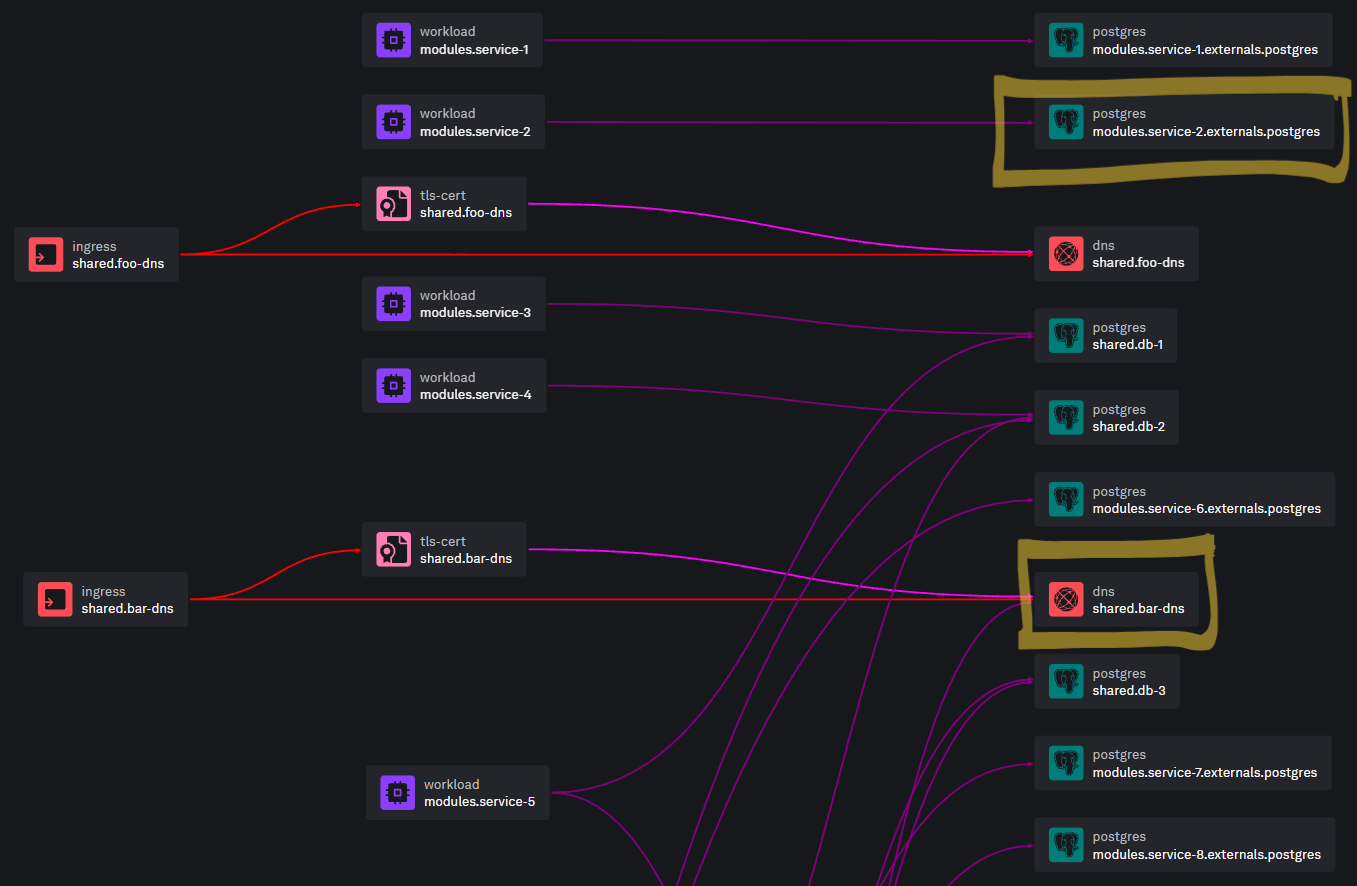
In full deployment mode, all Resources would undergo the re-provisioning process which, while being idempotent, involves quite some processing. In the case of the popular Terraform/OpenTofu Container Runner taking care of provisioning, that processing includes:
- Kubernetes Job/Pod scheduling, creation, and startup
- Terraform/OpenTofu
initincluding the download of all required providers. This step alone can take up to several minutes for complex modules with numerous and/or large providers - Terraform/OpenTofu
applyinvolving theplan, even if the outcome is "No changes" - Job/Pod shutdown
Multiply the time required by n Resources in your graph and it adds up. We observed deploy time reductions by 75% and more in our own testing rounds for incremental vs. full mode. Every setup is different and time savings vary depending on the provisioning mechanism, so your gain may be greater or smaller than that.
What does "changed" mean?
A Resource is re-provisioned in incremental mode when any of the following has changed since its last successful provisioning:
- Properties of the matched Resource Definition:
driver_type,driver, ordriver_account. - The resolved values of the Resource’s inputs (both the Driver inputs and Resource Inputs), after placeholders have been substituted with the current outputs of its dependencies.
- A secret reference in the Resource’s inputs — the secret store name, the key, or the version.
A Resource whose previous deployment did not succeed is always retried, regardless of the mode.
In practice, these common changes made in everyday operations will cause a Resource re-provisioning even in incremental mode:
Changed resource params values in Score:
apiVersion: score.dev/v1b1
# ...
resources:
  hpa:
    type: horizontal-pod-autoscaler
    params:
      # ⬇️ Changed values will re-provision
      minReplicas: 1
      maxReplicas: 3
Changed git ref in or secret ref version in a Resource Definition:
resource "humanitec_resource_definition" "my-resdef" {
  # ...
  driver_inputs = {
    values_string = jsonencode({
      # ...
      "source" = {
        # ⬇️ Changing the tag will re-provision
        "ref" = "refs/tags/v1.2.3"
        "url" = "https://..."
      }
    })
    secret_refs = jsonencode({
      "source" = {
        "password" = {
          "store"   = "my-store"
          "ref"     = "path/to/password"
          # ⬇️ Changing the version will re-provision
          "version" = 3
        }
      }
    })
  }
}
Recommendation: Consistently use version pinning for external components to ensure your Resources get updated when they need to be.
Limitations
Some limitations apply when using incremental mode:
- Rotating a secret value behind a secret reference does not trigger re-provisioning. Mitigation: pin and update secret versions as advised just previously
- No drift detection for skipped Resources. Mitigation: run a periodic
fulldeployment
Find more details in our developer docs.
What's next?
Give it a try! Run some deployments in incremental mode, time them, and compare them to traditional full mode. Look at the limitations and define a strategy that balances speed and risk. Remember that the mode is a per-deployment choice, so you may want to expose the option to whomever person, agent, or tool, is triggering it, and let them make the call. Enjoy!
